
Download & Upload Time Calculator
Estimate real file transfer duration taking into account network overhead, Wi-Fi losses, and server platform limits for Steam, PS5, Xbox, and 4K media.

Install SpeedDownload App
PWA 100% OfflineLaunch instantly from your home screen, 100% offline-ready, no address bar, ultra-fast.
Real Calculation Result
Estimated real-world time (with overhead)
15 min 42 s
50 GB Mobile Data Cap Impact
Consumes approx. 100% of a standard 50 GB monthly plan.
Recommended Disk Space
Allow double the space during game installation (e.g., Steam/PS5).
▶️ Live Download Progress Simulator
Visually experience real-time progress with dynamic speed variations.
📊 Speed Comparison for this File (50 Go)
Estimated time required to download this specific file across various internet tier packages.
| Connection / Technology | Bandwidth | Speed in MB/s | Estimated duration |
|---|---|---|---|
| ADSL 2+ (15 Mbps) | 15 Mbps | 1.9 Mo/s | -- |
| VDSL2 / 4G (50 Mbps) | 50 Mbps | 6.3 Mo/s | -- |
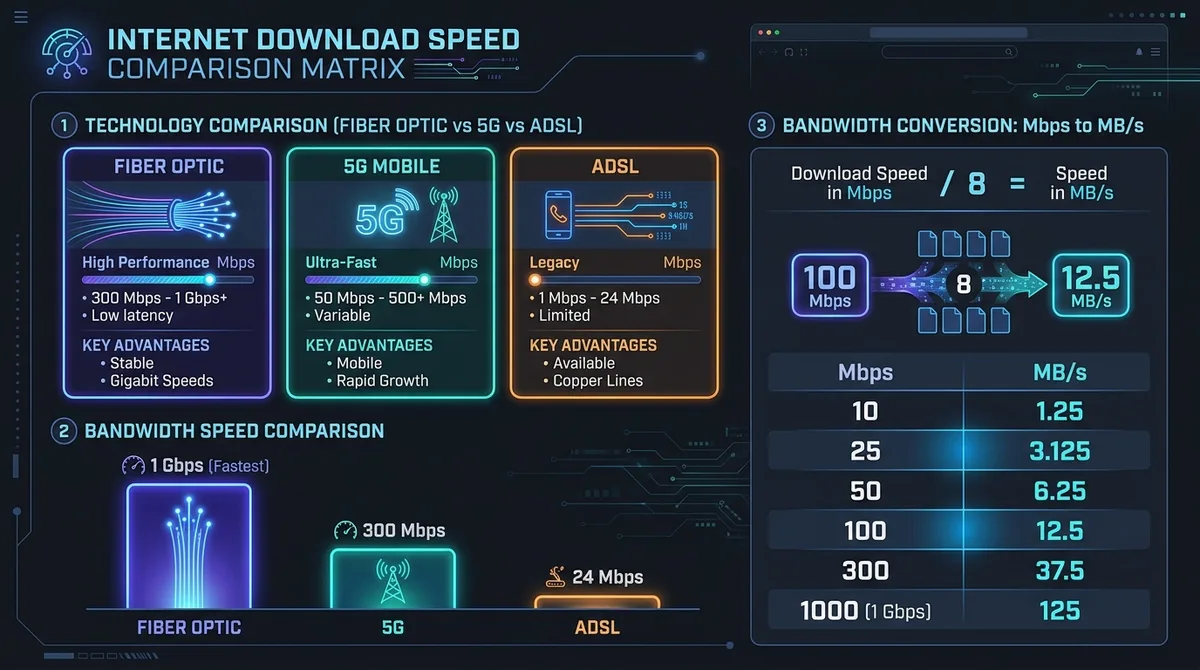
| VDSL / Fibre Éco 100 Mbps | 100 Mbps | 12.5 Mo/s | -- |
| Fibre Standard 300 Mbps | 300 Mbps | 37.5 Mo/s | -- |
| Fibre Confort 500 Mbps | 500 Mbps | 62.5 Mo/s | -- |
| Fibre Gigabit 1 Gbps | 1000 Mbps | 125.0 Mo/s | -- |
| Fibre Pro 2 Gbps | 2000 Mbps | 250.0 Mo/s | -- |
* Estimates based on standard TCP protocol with a 10% allowance for network overhead and decompression.
How Download Time is Calculated
⚡ Quick Answer:
On a standard 100 Mbps Fibre or 5G connection, downloading a 50 GB modern game takes approximately 1 hour and 7 minutes. On a 1 Gbps Gigabit connection, it takes only 6 minutes and 40 seconds.
Whether you're downloading a new video game on Steam, an update on PS5 or Xbox, or streaming 4K media, knowing the real file transfer duration helps you plan ahead. Our calculator takes the file size and connection bandwidth to produce an accurate duration in hours, minutes, and seconds.
Understanding the Units: Bits vs Bytes
Internet service providers (ISPs) advertise bandwidth in megabits per second (Mbps) or gigabits per second (Gbps), whereas hard drive storage and game files are measured in megabytes (MB) or gigabytes (GB). Because there are 8 bits in one byte, your real transfer rate in megabytes per second is your Mbps speed divided by 8.
Benchmark Download Times Reference Table
Here is a quick reference table showing estimated transfer durations across standard file sizes and popular internet speed tiers:
| File Size / Use Case | 25 Mbps (ADSL/4G) | 100 Mbps (Standard Fibre) | 500 Mbps (Fast Fibre) | 1 Gbps (Gigabit) |
|---|---|---|---|---|
| 5 GB (HD Movie / Indie Game) | 27 min 18 sec | 6 min 40 sec | 1 min 20 sec | 40 sec |
| 25 GB (4K Film / Update) | 2 hr 16 min | 33 min 20 sec | 6 min 40 sec | 3 min 20 sec |
| 50 GB (AAA Game) | 4 hr 33 min | 1 hr 07 min | 13 min 20 sec | 6 min 40 sec |
| 100 GB (Modern Big Title) | 9 hr 06 min | 2 hr 14 min | 26 min 40 sec | 13 min 20 sec |
Why Real Downloads Can Take Longer
The calculations shown above reflect theoretical speeds. In daily practice, downloads may be 10% to 25% slower due to TCP/IP packet overhead, Wi-Fi interference, remote CDN server throttling, or peak-time ISP routing congestion.
Frequently Asked Questions
How do I calculate download time?
Enter the file size and your internet speed. The calculator divides the file size by your effective bandwidth to determine the estimated download duration.
What is the difference between Mbps and MB/s?
Mbps stands for megabits per second (ISP advertising speed), while MB/s means megabytes per second (file size). Since 1 byte = 8 bits, 1 MB/s equals 8 Mbps. Our calculator handles this conversion automatically.
Why is my real download slower than the calculator estimate?
Network overhead, server throttling (e.g. busy Steam or PSN servers), Wi-Fi signal loss, and concurrent household streaming reduce real-world throughput.
Can I calculate upload time?
Yes! Switch to the 'Upload Time' tab and input your upstream speed. Keep in mind cable and ADSL connections often have significantly lower upload bandwidth than download.
Can I install this calculator as an app?
Yes! SpeedDownload Pro is a Progressive Web App (PWA). Click 'Install Web App' or use 'Add to Home Screen' on Safari iOS to use it offline with zero lag.